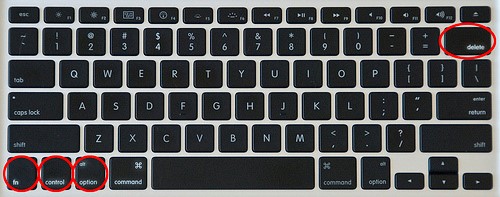
How do you do Ctrl + Alt + Del on a Mac Remote Desktop? The easiest way to quit an unresponsive app on a Remote Desktop Mac is by using the onscreen keyboard. You can use the Command + Q keyboard command, Command + Option + Escape, or simply restart your Mac.
How do you do Ctrl Alt Del on Mac Remote Desktop?
 DIY
1 min read
DIY
1 min read
On this page
More from Windows
Windows 11 LTSC Complete Guide: Install, Set Up & Optimize (2026)
Windows 11 LTSC (Long-Term Servicing Channel) is the cleanest, most bloat-free version of Windows 11 you can run. No Cortana, no forced Microsoft Account,…
10 Windows 11 Settings You Should Change After Installation 2026
Getting a new computer or installing Windows 11 is exciting, but the default settings aren’t always the best choice. Several features prioritize convenience over…

How to Reset a Forgotten Windows Password (Every Method Explained)
Being locked out of your own Windows PC is one of the most frustrating tech problems — especially because the fix is usually simple…

How to Fix Slow Windows 11 Startup: 10 Real Fixes That Actually Work
If your Windows 11 PC is slow to start, the fix depends entirely on where the slowness actually is — and most guides skip…

How to Update Windows Drivers Safely (Complete 2026 Guide)
Your drivers are the invisible layer between Windows and your hardware — and when they go wrong, everything from your GPU to your Wi-Fi…

How to Fix a USB Device Not Recognized
You plug in your USB drive and Windows pops up with a dreaded yellow warning: “USB Device Not Recognized.” The drive doesn’t appear in…