DIY
DIY
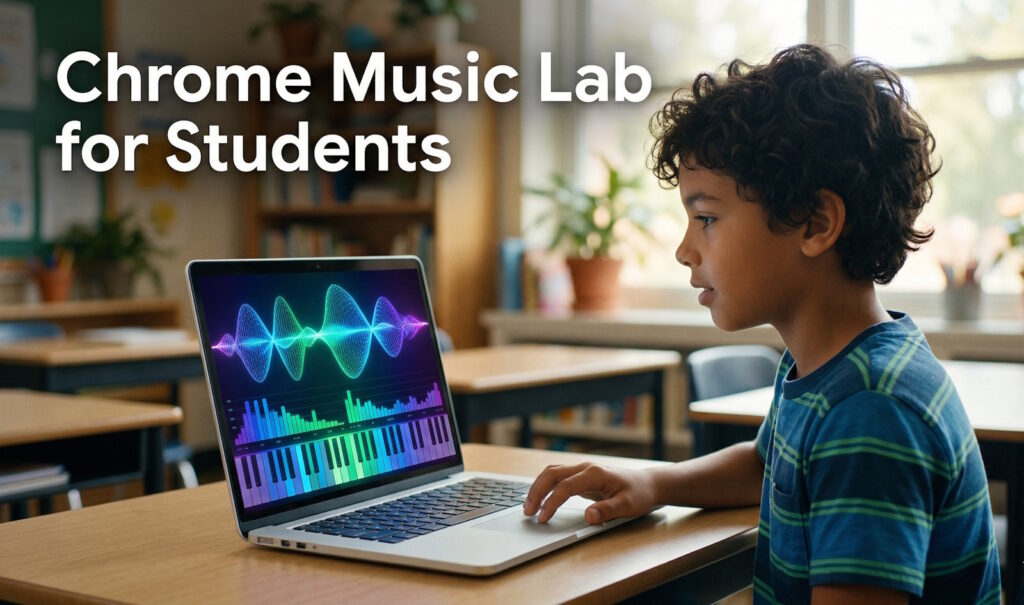
Chrome Music Lab is a free, browser-based collection of interactive experiments created by Google that lets students explore music and the science behind it — no downloads, no accounts, no instruments required. Whether you’re a teacher building a STEM lesson plan or a parent looking for a hands-on home learning activity, this tool turns abstract concepts like sound waves, frequencies, and rhythm into something students can see and feel in real time.
What makes Chrome Music Lab especially powerful in education is that it sits at the crossroads of music, physics, math, and art — making it one of the most versatile music learning tools available for free online. This guide walks through how to use it effectively in classrooms and at home.

Chrome Music Lab in Education
Chrome Music Lab (musiclab.chromeexperiments.com) launched as part of Google’s Chrome Experiments initiative. It currently offers 14 interactive experiments, each designed to illustrate a different aspect of music and sound science. The platform works entirely in a web browser — on Chromebooks, laptops, tablets, and even smartphones — which makes it uniquely accessible for schools with varied device policies.
Teachers across elementary, middle, and high school levels have adopted Chrome Music Lab because it requires zero setup and no prior musical knowledge from students. It supports in-person, hybrid, and fully remote learning environments equally well. Students who have never touched an instrument can immediately begin exploring melody, rhythm, harmony, and the physics of sound within the same session.
Why It Works for STEM and Music Together
Traditional music education and STEM education have historically been taught in isolation. Chrome Music Lab bridges that gap by grounding every musical concept in observable science. When a student plays a note in the Sound Waves experiment, they don’t just hear it — they watch blue dots representing air molecules ripple outward. That single moment connects physics, biology (how ears work), and music theory in one visual.
This interdisciplinary approach aligns directly with modern curriculum frameworks that emphasize STEAM (Science, Technology, Engineering, Art, and Math) integration. Music becomes a vehicle for scientific inquiry rather than a separate subject, which helps students who identify more with STEM develop an appreciation for the arts — and vice versa.
Understanding Sound Waves and Frequencies

Two experiments on Chrome Music Lab are particularly effective for teaching the science of sound: Sound Waves and Spectrogram. Both are hands-on, require no reading, and produce immediate visual feedback that students can manipulate and discuss.
The Sound Waves Experiment
In the Sound Waves experiment, a grid of blue dots represents air molecules. When you press any key on the on-screen piano, the dots vibrate to show exactly how sound energy propagates through air. You can click the magnifying glass icon to isolate a single molecule and observe its back-and-forth compression in detail — a near-perfect visual analogy for longitudinal wave motion covered in most middle school physics curricula.
Key concepts students can observe and discuss:
- Frequency: Higher notes cause faster, more compressed vibrations; lower notes produce slower, wider waves
- Amplitude: The height of the wave pattern corresponds to how loud a sound is perceived
- Propagation speed: All notes travel at the same speed through air, regardless of pitch — a common misconception students can test and debunk themselves
- Interference: Play two notes simultaneously and watch how their wave patterns overlap and interact
The Spectrogram Experiment
The Spectrogram experiment takes sound analysis one step further by displaying a real-time frequency map of any sound that enters the microphone or plays through the browser. The horizontal axis represents time, the vertical axis represents frequency (from low at the bottom to high at the top), and colour intensity shows amplitude.
Students can speak, sing, clap, whistle, or play an instrument directly into their device’s microphone and watch their voice turn into a visual pattern. Comparing the spectrogram of a violin versus a guitar playing the same note is a powerful demonstration of timbre — why two instruments at the same pitch sound completely different. This is the foundation of acoustics and audio engineering, introduced at a level a 10-year-old can grasp.
The Oscillators Experiment
For older students or those ready to go deeper, the Oscillators experiment introduces four fundamental waveforms: sine, square, sawtooth, and triangle. Each waveform produces a distinctly different sound quality at the same pitch. Students drag from top to bottom of the screen to move from high to low frequencies while switching between waveforms, building intuitive understanding of the relationship between wave shape and perceived sound — a concept central to both music synthesis and electrical engineering.
Visualizing Music Concepts with Experiments
Beyond pure physics, Chrome Music Lab includes experiments that visualize abstract music theory concepts — things like rhythm, harmony, melody, and chord structure — that students traditionally struggle to grasp from notation alone.
Rhythm
The Rhythm experiment presents a circular beat grid where students activate different percussion instruments at different points in the loop. Each instrument occupies its own ring of the circle, and the playhead sweeps around continuously, triggering sounds as it passes active dots. Students immediately hear how syncopation works — that is, placing hits between the main beats — and can experiment with polyrhythm by setting two instruments to different beat divisions.
Chords
The Chords experiment visualises the harmonic relationship between notes in a chord. When you play a major chord versus a minor chord, the visual pattern clearly shows how the spacing between notes differs — students can see that minor chords use a compressed inner interval compared to major chords. This gives music theory a geometric dimension that helps visual learners retain the concept far better than memorising rules.
Arpeggios and Melody Maker
The Arpeggios experiment shows how broken chords (playing notes in sequence rather than simultaneously) create forward motion in music. Pair this with Song Maker — arguably the most popular experiment on the platform — and students can compose their own 16-bar melody, adjust tempo, change instruments, and share their piece via a unique URL that generates automatically. There is no login required.
| Experiment | Primary Concept | Best Age Range | Curriculum Link |
|---|---|---|---|
| Sound Waves | Wave propagation, frequency, amplitude | Ages 8–14 | Physics / Science |
| Spectrogram | Frequency analysis, timbre | Ages 10–16 | Physics / Music |
| Oscillators | Waveforms, synthesis | Ages 12–18 | Physics / Technology |
| Rhythm | Beat, meter, polyrhythm | Ages 6–12 | Music / Math |
| Chords | Harmony, intervals | Ages 8–14 | Music Theory |
| Song Maker | Melody, composition, structure | Ages 6–18 | Music / Creative Arts |
| Arpeggios | Chord patterns, broken chords | Ages 10–16 | Music Theory |
Lesson Plans and Classroom Activities
The following structured activities are ready to drop into a 45–60 minute class period. Each one is designed to require no specialist music equipment and no prior student experience with music theory.
Activity 1: The Voice Science Lab (Grades 4–8)
Objective: Students use the Spectrogram experiment to investigate how different sounds produce different frequency patterns, then connect their findings to how the human ear distinguishes sounds.
- Open Spectrogram on the classroom projector. Allow microphone access when prompted.
- Demonstrate the spectrogram by speaking, then singing a sustained note, then clapping. Discuss what changed visually.
- Split students into pairs. One student produces a sound (voice, desk tap, book drop); the other sketches the resulting pattern on paper.
- Reconvene and compare sketches. Ask: which sounds produced the highest frequencies? Which produced the lowest? What made the widest pattern?
- Extension: Compare the spectrogram of the same note played on two different instruments (use YouTube clips if live instruments aren’t available). Why do the patterns differ if the pitch is the same?
Activity 2: Build a Beat (Grades 2–6)
Objective: Students use the Rhythm experiment to understand beat, meter, and how layering percussion instruments creates a groove.
- Open the Rhythm experiment. Show students how clicking a dot activates that beat position for that instrument.
- Start with just the kick drum — activate only beats 1 and 3 to establish a basic backbeat. Let it loop and count along.
- Add a hi-hat on every beat. Ask students: does it feel faster or slower? (It feels faster because there are more subdivisions.)
- Remove all dots and challenge pairs of students to recreate a recognisable rhythm — the first four beats of “We Will Rock You” works well as a starter pattern.
- Extension: Introduce polyrhythm by setting one instrument to 3-beat subdivisions and another to 4-beat subdivisions. Ask students to count how many beats until the pattern repeats (answer: 12 — connecting rhythm to the concept of least common multiple in math).
Activity 3: Compose and Perform (Grades 5–8)
This activity is adapted from a published lesson plan by West Music and pairs digital composition with live performance.
- Open Song Maker. Set it to 16 bars, C major scale, quarter-note subdivisions.
- Students compose an 8–16 bar melody within 20 minutes. Constraint: the melody must start and end on C, and must use only notes within a single octave.
- Students share their composition via the generated link and submit it to the teacher.
- Teacher projects each piece in turn; the class performs it using whatever instruments are available — recorders, xylophones, Boomwhackers, or even desktop instrument simulators.
- Discussion: what made some melodies easier to perform? What made them memorable? This leads directly into concepts of stepwise motion, leaps, and phrase structure.
Activity 4: Waveform Art (Grades 6–10, Cross-Curricular with Art)
This activity connects the Oscillators experiment to both art and technology.
- Open Oscillators and cycle through the four waveforms (sine, square, sawtooth, triangle) at several different frequencies. Students sketch each waveform shape in their notebooks.
- Ask students to label what each shape looks like to them (sine = smooth hill, square = steps, sawtooth = shark fins, triangle = zigzag).
- Students then draw their own invented waveform shape and predict how it might sound — would it be buzzy, smooth, harsh, or soft?
- Research extension: students look up how synthesisers in music production use these exact waveforms as the starting point for every sound in electronic music.
DIY Home Learning with Music Lab
Chrome Music Lab is just as effective at home as it is in a classroom, and parents don’t need any musical background to guide their children through it. The experiments are self-directed by design — there’s no wrong answer and no way to “lose.” Here are some structured approaches for home learners across different age groups.
For Young Learners (Ages 5–8): Rhythm Explorer
Start with the Rhythm and Piano Roll experiments. Both use colour and visual patterns rather than traditional music notation, making them immediately accessible. Encourage children to tap along to the rhythm they build, helping develop both timing and fine motor coordination. The Piano Roll experiment shows famous classical pieces playing out as scrolling colour blocks — watching Beethoven’s “Ode to Joy” rendered in bright coloured rectangles is a surprisingly engaging introduction to classical music.
For Middle School Learners (Ages 10–14): Sound Science Project
Turn Chrome Music Lab into a proper science fair project. The student’s question could be: “How does the shape of a sound wave affect how we perceive its quality?” Using the Oscillators and Spectrogram experiments as their tools, they can document their findings with screenshots, write up observations, and even present a short comparison of natural sounds (voice, clapping) versus synthesised waveforms. This is genuine scientific method applied to a real phenomenon, using a tool that costs nothing.
For Teen Learners (Ages 14–18): Music Production Gateway
Older students interested in music production will find Chrome Music Lab’s Oscillators and Song Maker experiments function as an accessible gateway to understanding professional tools. The four waveforms in Oscillators are the same waveforms found in every synthesiser — hardware or software. Song Maker’s grid-based sequencer is structurally identical to how DAW (Digital Audio Workstation) piano rolls work in tools like GarageBand, FL Studio, or Ableton. Starting here removes intimidation and builds vocabulary before students encounter professional software.
Weekly Home Schedule: 5-Day Music Science Exploration
- Day 1 — Sound Waves: Explore how different notes create different wave patterns. Count how many waves appear for a high C versus a low C.
- Day 2 — Spectrogram: Record different household sounds (running water, a fan, a door closing). Compare their frequency patterns.
- Day 3 — Rhythm: Build a 4-bar drum pattern. Try to recreate the rhythm of a favourite song.
- Day 4 — Chords: Play a major chord, then a minor chord on the same root note. Write down three words describing how each one feels emotionally.
- Day 5 — Song Maker: Compose a short melody using only the notes from Day 4’s chord. Share the link with a family member.
Frequently Asked Questions
Is Chrome Music Lab completely free?
Yes. Chrome Music Lab is 100% free, requires no account or login, and works on any device with a modern web browser. There are no premium features or paid tiers.
Does Chrome Music Lab work on iPad and Android tablets?
Most experiments work on iOS and Android browsers, though a small number of experiments that require microphone access may behave differently depending on browser permissions. For the most consistent experience, Chrome browser on a laptop or Chromebook is recommended.
What age group is Chrome Music Lab best suited for?
The platform scales remarkably well across ages. Experiments like Rhythm and Piano Roll work well from age 5 upward, while Oscillators and Spectrogram offer depth that keeps high school and even college-level students genuinely engaged. Most activities in this guide target the 8–14 age range as a primary audience.
How does Chrome Music Lab support STEM learning specifically?
Chrome Music Lab directly supports STEM music projects by grounding every musical concept in observable physics. Sound Waves demonstrates longitudinal wave propagation. Spectrogram introduces frequency analysis and Fourier decomposition at an intuitive level. Oscillators covers waveform mathematics. Each of these topics appears in standard middle and high school science curricula, making the platform a genuine cross-disciplinary teaching tool rather than simply an enrichment activity.
Can students share their compositions?
Yes. The Song Maker experiment generates a unique shareable URL every time a student saves their composition. No login is required. Teachers can collect these links via a shared document or classroom platform to review student work asynchronously.
Are there official lesson plans available?
Google does not publish its own structured lesson plans for Chrome Music Lab, but a strong community of music educators has developed and shared resources. West Music, Midnight Music, and the National Association for Music Education all maintain freely available lesson materials built around the platform. Links to curated resources are also available through our Educational Tech Tools section.