DIY
DIY
If you’ve ever wondered what is an operating system, you’re not alone. An operating system is the software that powers computers, smartphones, tablets, and many other digital devices. It manages hardware, runs applications, organizes files, and keeps everything working smoothly behind the scenes. In this guide, you’ll learn what an operating system is, how it works, its main functions, and why it’s essential for every modern device.
What Is an Operating System
An operating system (OS) is the most important software on any computer, smartphone, tablet, or server. It acts as a bridge between the hardware and the applications you use every day. Without an operating system, your device wouldn’t know how to start, display graphics, manage memory, connect to the internet, or open programs.

Whether you’re browsing the web, editing documents, playing games, or writing code, the operating system works silently in the background to keep everything running smoothly. In this guide, you’ll learn what an operating system is, how it works, its main functions, the different types available, and why it remains the foundation of modern computing in 2026.
What Is an Operating System?
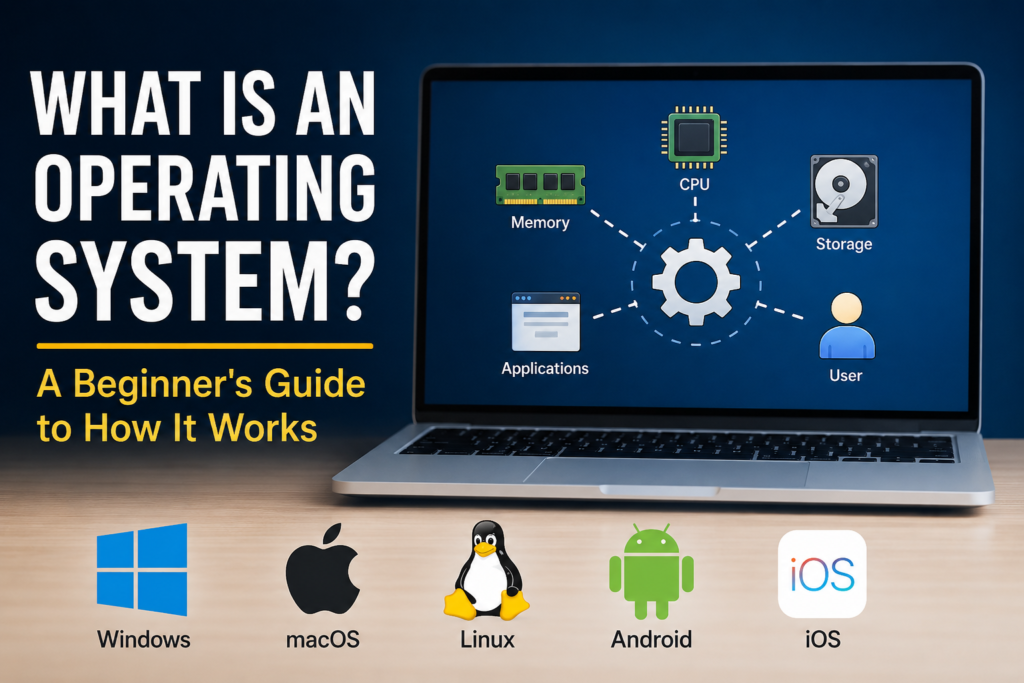
An operating system is system software that manages a device’s hardware and software resources. It provides an environment where applications can run while ensuring the processor, memory, storage, and connected devices all work together efficiently.
Think of the operating system as the manager of a busy office. Every application requests resources, and the OS decides who gets access and when.
Without an operating system, users would have to communicate directly with computer hardware, which would be extremely difficult for everyday tasks.
How Does an Operating System Work?
When you press the power button on your device, a small firmware program starts first. It checks that the hardware is functioning correctly before loading the operating system from the storage drive into memory.
Once loaded, the operating system:
- Initializes hardware components
- Loads device drivers
- Starts essential background services
- Displays the login screen
- Launches the desktop or home screen
- Allows applications to run
From that point onward, every interaction you make passes through the operating system.
Main Functions of an Operating System
1. Process Management
Modern computers often run dozens or even hundreds of programs simultaneously.
The operating system schedules processor time so each application gets the resources it needs without slowing everything else down.
2. Memory Management
RAM is limited.
The operating system decides which programs stay in memory and which data should be temporarily moved to storage when memory becomes full.
Efficient memory management improves performance and prevents crashes.
3. File Management
Every document, photo, video, and application lives inside a file system managed by the operating system.
It organizes files into folders, tracks permissions, and ensures data can be retrieved quickly.
4. Device Management
Keyboards, printers, graphics cards, webcams, Bluetooth adapters, USB drives, and monitors all communicate through device drivers managed by the operating system.
Without these drivers, most hardware wouldn’t function correctly.
5. Security
Operating systems include built-in security features such as:
- User accounts
- Password protection
- Encryption
- Firewalls
- Permission controls
- Secure boot
- Automatic security updates
These features help protect devices from malware and unauthorized access.
6. User Interface
The operating system provides the interface people interact with every day.
This may include:
- Desktop environments
- Windows
- Icons
- Menus
- Touch interfaces
- Command-line terminals
A good interface makes devices easier and more enjoyable to use.
Types of Operating Systems
Desktop Operating Systems
Designed for personal computers and laptops.
Popular examples include Windows, macOS, and Linux.
Mobile Operating Systems
Built specifically for smartphones and tablets.
Android and iOS dominate the mobile market.
Server Operating Systems
Servers require operating systems optimized for stability, networking, virtualization, and security.
Linux distributions are especially common for hosting websites and cloud services.
Real-Time Operating Systems
Used in medical equipment, industrial machinery, robotics, and automotive systems where timing is critical.
These systems prioritize predictable response times over general-purpose computing.
Popular Operating Systems in 2026
Windows
Windows remains one of the world’s most widely used desktop operating systems.
It offers broad software compatibility, strong gaming support, and extensive business tools, making it popular with both consumers and organizations.
macOS
Apple’s macOS is designed exclusively for Mac computers.
It is known for its polished interface, strong security features, excellent battery optimization, and seamless integration with other Apple devices.
Linux
Linux is an open-source operating system used everywhere from personal laptops to cloud servers and supercomputers.
Its flexibility, stability, and security have made it the preferred choice for many developers and system administrators.
Android
Android powers billions of smartphones, tablets, smart TVs, and wearable devices worldwide.
Its open ecosystem allows manufacturers to customize the operating system for different hardware.
iOS
Apple’s iOS focuses on performance, privacy, and integration within the Apple ecosystem.
It receives regular updates and is widely recognized for its smooth user experience.
Why Operating Systems Matter
Every digital activity depends on an operating system.
Whether you’re:
- Browsing websites
- Watching videos
- Gaming
- Editing photos
- Writing documents
- Programming software
- Hosting websites
The operating system coordinates everything happening behind the scenes.
Without it, applications couldn’t communicate with your hardware.
Operating Systems and Cybersecurity
Operating systems play a major role in protecting users from cyber threats.
Modern operating systems include security technologies such as:
- Sandboxing
- Secure Boot
- Built-in antivirus support
- Automatic updates
- Disk encryption
- Multi-factor authentication support
- Memory protection
Keeping your operating system updated is one of the simplest ways to improve your cybersecurity.
Many attacks target vulnerabilities that have already been patched through official updates.
Choosing the Right Operating System
The best operating system depends on your needs.
If you enjoy gaming and broad software compatibility, Windows is often a strong choice.
If you prefer a tightly integrated ecosystem with creative applications, macOS may be ideal.
If you value flexibility, customization, and open-source software, Linux offers countless possibilities.
For smartphones, Android provides extensive customization, while iOS delivers a streamlined experience with long-term software support.
The Future of Operating Systems
Operating systems continue to evolve.
Artificial intelligence is becoming more deeply integrated into desktop and mobile platforms, helping users automate tasks, search files more efficiently, and improve productivity.
Future operating systems are also expected to emphasize stronger privacy protections, improved energy efficiency, cloud integration, and enhanced security against emerging cyber threats.
As technology advances, operating systems will remain the foundation that connects users, applications, and hardware.
Frequently Asked Questions
What is an operating system in simple words?
An operating system is the main software that controls a computer or smartphone and allows applications to run.
Can a computer work without an operating system?
Technically yes, but it would not be practical for everyday use because users would need to communicate directly with the hardware.
Which operating system is the most popular?
Windows, Android, iOS, macOS, and Linux are among the most widely used operating systems worldwide, each serving different devices and use cases.
Why should I update my operating system?
Updates fix security vulnerabilities, improve stability, add new features, and enhance overall performance.
Conclusion
An operating system is the foundation of every modern computing device. It manages hardware resources, runs applications, secures data, and provides the interface users rely on every day. Whether you’re using Windows, macOS, Linux, Android, or iOS, the operating system quietly performs thousands of tasks every second to keep your device functioning efficiently.
Understanding how operating systems work not only helps you become a more informed technology user but also improves your ability to troubleshoot issues, make smarter purchasing decisions, and stay secure online. As computing continues to evolve in 2026 and beyond, the operating system will remain the essential software that powers our digital world.