DIY
DIY

Your keyboard is your primary tool as a programmer. You’ll spend thousands of hours typing code, navigating IDEs, and debugging — so settling for a mushy membrane keyboard is a real productivity tax. The right mechanical keyboard gives you tactile confidence, reduces finger fatigue, and can even help prevent repetitive strain injuries over the long haul.
We tested and researched the top options available on Amazon right now to bring you this definitive guide. Whether you’re a seasoned backend engineer, a frontend developer, a student learning to code, or a data scientist grinding through notebooks, there’s a perfect mechanical keyboard on this list for your workflow and budget.

In this guide:
-
- Our top 8 mechanical keyboard picks for programmers in 2026
- Quick comparison table
- Buyer’s guide — what actually matters for coding
- FAQ
Disclosure: TechDIY.info participates in the Amazon Associates Program. If you purchase through our links, we earn a small commission at no extra cost to you. This helps us keep the site running and the reviews independent.
Quick Comparison: Top 8 Mechanical Keyboards for Programmers
| # | Model | Layout | Switch Type | Connectivity | Best For | Check Price |
|---|---|---|---|---|---|---|
| 1 | Keychron Q1 Max | 75% | Gateron G Pro (tactile/linear) | Wired / BT / 2.4GHz | Best overall | Amazon → |
| 2 | Keychron K8 Pro | TKL (80%) | Gateron G Pro (multiple options) | Wired / BT | Budget premium | Amazon → |
| 3 | Keychron K4 HE | 96% | Hall Effect (magnetic) | Wired / BT / 2.4GHz | Customizable actuation | Amazon → |
| 4 | Keychron Q11 | Split 75% | Gateron G Pro (multiple options) | Wired | Ergonomic / RSI prevention | Amazon → |
| 5 | Leopold FC750R | TKL (80%) | Cherry MX (multiple options) | Wired (USB-C) | Silent premium typing | Amazon → |
| 6 | Glorious GMMK Pro | 75% | Hot-swap (any 5-pin switch) | Wired (USB-C) | Enthusiast / customizer | Amazon → |
| 7 | Logitech MX Mechanical | Full-size (100%) | Logi tactile quiet / linear / clicky | Wired / BT / Logi Bolt | Multi-device wireless | Amazon → |
| 8 | Keychron C3 Pro | TKL (80%) | Gateron G Pro (multiple options) | Wired (USB-C) | Best budget pick | Amazon → |
What Makes a Mechanical Keyboard Great for Programming?
Not all mechanical keyboards are created equal — and the features that gamers care about (ultra-fast actuation, flashy RGB lighting) aren’t always the same ones that matter most after eight hours of coding. Here’s what to actually look for.
Switch Type: The Single Most Important Decision
The switch determines how your keyboard feels, sounds, and performs. For programmers, there are three main categories:
- Tactile switches (e.g. Gateron Brown, Cherry MX Brown, Boba U4T) — The most popular choice for developers. A physical “bump” confirms each keypress without you having to bottom out the key, which reduces typos and finger fatigue. Not too loud for open offices.
- Linear switches (e.g. Gateron Red, Cherry MX Red) — Smooth, quiet, and consistent. Great for office environments or anyone who prefers a softer typing feel. Slightly higher risk of accidental keypresses until you build muscle memory.
- Clicky switches (e.g. Cherry MX Blue, Gateron Blue) — Loud, satisfying, and highly tactile. Beloved by programmers who type at home — but your coworkers and anyone on your video calls will hear every keystroke.
- Hall Effect / magnetic switches (e.g. Keychron K4 HE) — The newest innovation. These use magnets instead of physical contact, meaning they never wear out and you can precisely tune the actuation point. Outstanding for developers who want precision.
Layout: How Much Keyboard Do You Actually Need?
- 75% layout — The sweet spot for most programmers. Keeps the function row (invaluable for IDE shortcuts and debugging), arrow keys, and a few navigation keys, while cutting the bulky numpad. Your mouse sits closer to your body — great for ergonomics.
- TKL (Tenkeyless / 80%) — Same as 75% but with a little more spacing between key clusters. Very comfortable, widely available.
- 96% / Full-size — Keeps the numpad. Worth it if you work heavily with numbers (data science, financial modeling).
- Split layout — Two separate keyboard halves you position at shoulder width. The most ergonomic option and the best choice if you’re experiencing wrist or shoulder strain.
QMK / VIA Programmability
QMK and VIA are open-source firmware standards that let you remap every key, create custom layers, and build shortcuts tailored to your workflow. For example, you can put your most-used IDE shortcuts (jump to definition, open terminal, run tests) on a single-key tap. If you’re serious about optimizing your coding workflow, QMK/VIA support is a must-have feature.
Hot-Swap Switches
Hot-swap sockets let you pull out switches and replace them without soldering. This means you can try different switch types over time without buying a whole new keyboard — a feature that used to be exclusive to custom builds but is now standard on most premium keyboards.
Build Quality
Aluminum frames feel premium, dampen sound, and don’t flex during aggressive typing. Gasket mounting (where the switch plate floats on silicone dampeners) adds a soft, cushioned feel that reduces finger fatigue significantly. Budget boards use plastic cases, which are perfectly fine but sound and feel different.
Connectivity
USB-C wired is the most reliable and latency-free option. Wireless tri-mode (USB-C + 2.4GHz + Bluetooth) is ideal if you switch between a desktop and a laptop or prefer a clean desk setup. Bluetooth alone is fine for light use but can introduce very occasional lag spikes.
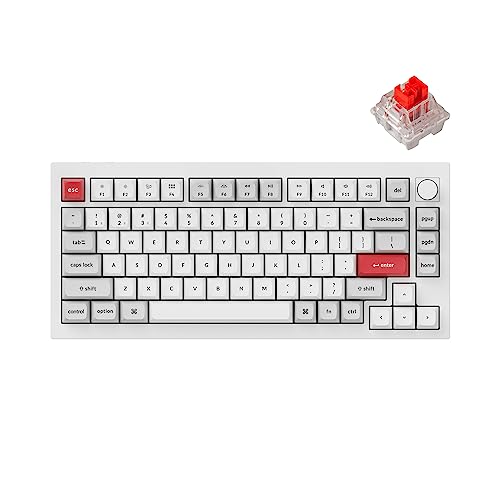
1. Keychron Q1 Max — Best Overall Mechanical Keyboard for Programmers
→ Check the latest price on Amazon
| Layout | 75% (84 keys) |
| Switches | Gateron G Pro 3.0 (tactile, linear, or clicky) |
| Connectivity | USB-C wired / Bluetooth 5.1 / 2.4GHz wireless |
| Build | CNC machined aluminum, gasket mount |
| Firmware | QMK + VIA |
| Hot-swap | Yes (5-pin) |
| OS compatibility | Mac + Windows + Linux |
Why We Picked It
The Keychron Q1 Max is, quite simply, the best all-around mechanical keyboard for programmers available on Amazon right now. It has everything: a compact 75% layout that keeps the function row and arrow keys, a triple-mode wireless system so you can go wired or cable-free, full QMK/VIA programmability for deep customization, and an aluminum build with gasket mount that feels absolutely premium to type on. This is the keyboard you buy once and keep for years.
Key Features
- Triple-mode wireless: Switch seamlessly between USB-C, 2.4GHz dongle (virtually zero lag), and Bluetooth across up to three devices. Perfect for developers who switch between a desktop workstation and a MacBook.
- Gasket mount construction: The switch plate is suspended on silicone, giving each keystroke a cushioned, “bouncy” feel that dramatically reduces finger fatigue during all-day typing sessions.
- QMK + VIA support: Build unlimited custom key layers — one tap for bracket pairs, another for navigation shortcuts, another for your most-used terminal commands. The power of a custom keyboard without the custom price.
- CNC aluminum frame: The keyboard is solid, heavy (in a good way), and feels like it will outlast your laptop, your desk, and possibly your career. It doesn’t flex, shift, or rattle.
- Hot-swappable switches: Try Gateron Browns today, swap to Reds next month — no soldering required. Your keyboard can evolve with your preferences.
- South-facing RGB: Better RGB visibility under keycaps compared to north-facing LEDs. Useful for those who want backlighting without shine-through interference.
Who It’s Best For
Developers who want one keyboard that handles everything — daily coding, video calls, desk-switching between machines — without compromise. Excellent for remote workers and hybrid developers.
Who Should Skip It
If you’re on a tight budget or need something ultralight for travel, the Q1 Max is heavy and premium-priced. Check the Keychron K8 Pro (#2) or C3 Pro (#8) instead.
Pros:
- Best-in-class build quality for the price
- Triple-mode wireless works flawlessly
- Full QMK/VIA programmability
Cons:
- Heavy — not ideal for travel
- Premium price point
- Wrist rest sold separately
→ Check the Keychron Q1 Max price on Amazon
2. Keychron K8 Pro — Best Mid-Range Pick for Programmers

→ Check the latest price on Amazon
| Layout | TKL / 80% (87 keys) |
| Switches | Gateron G Pro 3.0 (hot-swappable) |
| Connectivity | USB-C wired / Bluetooth 5.1 |
| Build | Aluminum frame, double-gasket mount |
| Firmware | QMK + VIA |
| Hot-swap | Yes (3-pin & 5-pin) |
| OS compatibility | Mac + Windows |
Why We Picked It
The K8 Pro delivers nearly the same experience as the Q1 Max at a meaningfully lower price. You get the same Gateron G Pro switches, the same QMK/VIA programmability, hot-swap support, and a solid aluminum build — the main trade-off being that it uses Bluetooth only (no 2.4GHz dongle) and has a TKL rather than 75% layout. For most programmers, that’s a perfectly fair trade. Software engineers using this keyboard as their daily driver consistently praise its reliability and typing feel.
Key Features
- Double-gasket mount: Two layers of gasket dampening make the typing experience notably soft and comfortable — a feature usually seen on more expensive keyboards.
- TKL layout with Mac/Windows modes: Physical toggle switch on the back swaps between Mac and Windows key layouts instantly — no software required. Ideal for developers who work across platforms.
- QMK + VIA: Full programmability. Map your IDE shortcuts, create layers for terminal commands, remap Caps Lock to Escape for Vim users.
- Bluetooth 5.1 — up to 3 devices: Pair with your work laptop, personal computer, and tablet simultaneously. Switch between them with a key combination.
- RGB backlighting with south-facing LEDs: Clean backlight visibility, and the shine-through PBT keycaps look excellent at night.
Who It’s Best For
Programmers who want a premium typing experience without paying the full Q1 Max premium. Also a great first “serious” mechanical keyboard for developers new to the category.
Who Should Skip It
If you need 2.4GHz wireless (lower latency than Bluetooth), opt for the Q1 Max. If budget is the main concern, the C3 Pro (#8) saves significantly more.
Pros:
- Excellent value for a premium build
- Double gasket mount — very comfortable for long sessions
- Mac + Windows compatibility out of the box
Cons:
- Bluetooth only — no 2.4GHz wireless
- No USB passthrough or media knob
- Stock keycaps are good but not exceptional
→ Check the Keychron K8 Pro price on Amazon
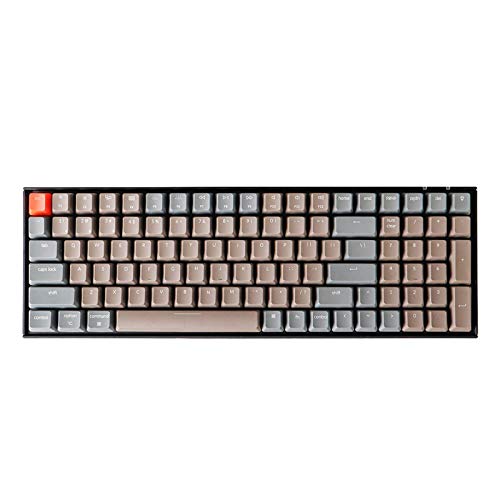
3. Keychron K4 HE — Best Hall Effect Keyboard for Programmers
→ Check the latest price on Amazon
| Layout | 96% (100 keys) |
| Switches | Keychron Magnetic Hall Effect |
| Connectivity | USB-C wired / Bluetooth 5.1 / 2.4GHz |
| Build | Aluminum frame, gasket mount |
| Firmware | Keychron Launcher (web-based config) |
| Hot-swap | Yes |
| OS compatibility | Mac + Windows + Linux |
Why We Picked It
Hall Effect switches are the most significant keyboard technology advancement in years, and the Keychron K4 HE brings this technology to a mainstream, Amazon-available keyboard at a reasonable price. Instead of physical contact points, each switch uses a magnet and sensor — meaning zero wear over time, and crucially, adjustable actuation points. You can set keys to trigger with a feather-light touch to minimize finger strain, or require a deeper press to prevent accidental keypresses. For developers who want maximum precision and the keyboard to outlast everything else on their desk, this is the pick.
Key Features
- Adjustable actuation (0.1mm – 4.0mm): Set each key’s trigger point via the Keychron Launcher web app. Reduce finger strain by triggering keys earlier, or increase accuracy by requiring deeper presses. This level of control is unprecedented at this price.
- Rapid Trigger mode: Keys re-activate the instant they start moving upward — no need to return to a reset point first. Translates to faster key repeat for rapid code navigation and keyboard shortcuts.
- Theoretically unlimited lifespan: No physical contacts to wear out. Hall Effect switches are rated well beyond the typical 50–100 million keystroke ratings of traditional mechanical switches.
- 96% layout with numpad: Keeps all the keys of a full-size keyboard in a noticeably more compact footprint. Great for data scientists and developers who use the numpad regularly.
- Triple-mode wireless: Same excellent wireless system as the Q1 Max — wired, 2.4GHz, and Bluetooth all work smoothly.
Who It’s Best For
Developers who want the most advanced switch technology available, those who frequently use the numpad, or anyone interested in fine-tuning actuation for reduced finger fatigue.
Who Should Skip It
If you prefer the simplicity of traditional switches and don’t need a numpad, the Q1 Max or K8 Pro are simpler and equally excellent choices.
Pros:
- Adjustable actuation — unique and genuinely useful for coders
- Theoretically never wears out
- Compact 96% keeps numpad without full-size bulk
Cons:
- Web-based config (requires internet to remap keys)
- Heavier than standard keyboards
- Hall Effect feel is different from traditional switches — takes adjustment
→ Check the Keychron K4 HE price on Amazon
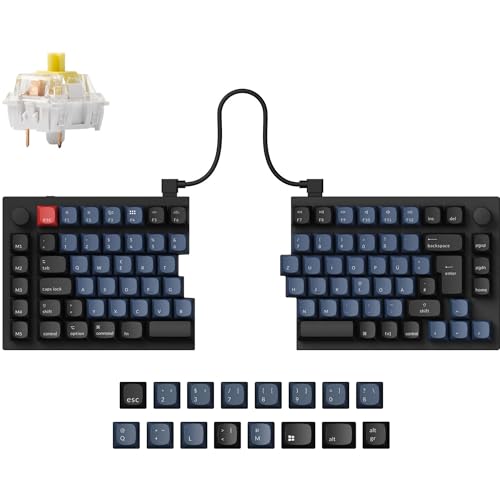
4. Keychron Q11 — Best Ergonomic Split Keyboard for Programmers
→ Check the latest price on Amazon
| Layout | Split 75% (each half independent) |
| Switches | Gateron G Pro 3.0 (hot-swappable) |
| Connectivity | USB-C wired |
| Build | Full aluminum CNC frame, gasket mount |
| Firmware | QMK + VIA |
| Hot-swap | Yes (5-pin) |
| OS compatibility | Mac + Windows |
Why We Picked It
If you’re experiencing wrist pain, shoulder tension, or have been warned about repetitive strain injury, the Keychron Q11 is the most practical and accessible solution. A split keyboard allows you to position each half at shoulder width and at whatever angle feels natural for your hands — eliminating the awkward inward rotation that conventional keyboards force on your wrists. The Q11 does all of this without sacrificing mechanical keyboard quality: it has the same aluminum build and gasket mount as Keychron’s flagship boards.
Key Features
- Fully independent halves: Position each half at any angle, at any width. Tilt them outward (tenting) to further reduce wrist pronation. This ergonomic freedom is transformative for developers with existing wrist or shoulder issues.
- Full aluminum CNC construction: Both halves are machined aluminum — the same premium build quality as Keychron’s non-split boards. This is a serious keyboard, not a compromise.
- Gasket mount on both halves: The cushioned, bouncy typing feel that reduces fatigue is present across the entire keyboard — not just one half.
- QMK + VIA: Deep programmability. Split keyboards particularly benefit from custom layers, as keys you’d normally reach for with your right hand can be reassigned to your left, and vice versa.
- 75% layout on each half: Keeps the function row and arrow keys — critical for developers — on both halves.
Who It’s Best For
Developers experiencing wrist pain, shoulder strain, or tension in their forearms. Also excellent for tall programmers whose natural shoulder width exceeds what a conventional keyboard accommodates.
Who Should Skip It
Split keyboards have a genuine adjustment period — expect 1–2 weeks of slower typing while your muscle memory adapts. If you travel with your keyboard frequently, two halves plus a cable is less convenient than a single unit. Also note: this model is wired only.
Pros:
- Genuinely ergonomic — reduces wrist and shoulder strain
- Premium aluminum build on both halves
- Full QMK/VIA for powerful layer customization
Cons:
- Significant learning curve for new split keyboard users
- Wired only — no wireless option
- More desk space required than conventional keyboards
→ Check the Keychron Q11 price on Amazon
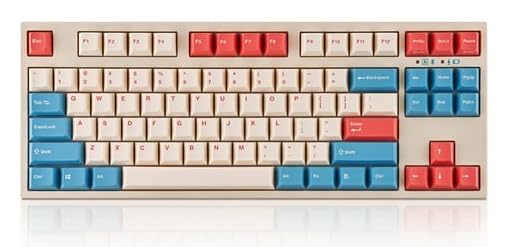
5. Leopold FC750R — Best Silent Premium Keyboard for Programmers
→ Check the latest price on Amazon
| Layout | TKL / 80% (87 keys) |
| Switches | Cherry MX (Silent Red, Brown, Red, or Blue) |
| Connectivity | Wired (USB-C detachable) |
| Build | ABS case with internal dampening pad |
| Firmware | No software required (DIP switches for basic layout) |
| Hot-swap | No |
| OS compatibility | Windows / Mac toggle |
Why We Picked It
The Leopold FC750R is the keyboard for programmers who value the typing experience above everything else — no RGB lighting, no wireless, no software ecosystem. Just exceptionally crafted hardware. Leopold builds keyboards with thick doubleshot PBT keycaps (the legends will never fade, even after years of heavy use), an internal sound-absorbing pad that makes this one of the quietest mechanical keyboards you can buy, and Cherry MX switches with legendary reliability. If you’d rather have a tool that just works than a platform to configure, the Leopold is your keyboard.
Key Features
- Internal sound-absorbing pad: Leopold installs dense foam inside the case, dramatically dampening the sound of each keystroke. Even the clicky Blue switch version is quieter than most competing keyboards. This is the go-to board for shared offices.
- Thick doubleshot PBT keycaps: These keycaps are notably heavier and more textured than what most keyboards ship with. The legends are molded through two layers of plastic — they will never shine, never fade, and never peel.
- Cherry MX switches: The most trusted and well-documented switch in the industry. Rated at 100 million keystrokes, consistent across every unit, and easy to find replacement switches for. The MX Brown option (tactile, quiet) is the default recommendation for programmers in offices.
- Detachable USB-C cable: If the cable gets damaged or you want to use a different one, it simply unplugs. A small but practical feature often missing on budget boards.
- No software required: DIP switches on the base handle basic layout remapping (Caps Lock to Ctrl, for example). No driver installation, no app to run, no cloud dependency.
Who It’s Best For
Developers in shared offices who need a quiet, professional-grade keyboard. Also excellent for programmers who prefer simplicity — no apps, no RGB, no fuss.
Who Should Skip It
If QMK/VIA programmability or wireless connectivity matters to you, look at the Keychron options instead. The Leopold is excellent at what it does, but it’s intentionally feature-minimal.
Pros:
- Exceptionally quiet — best choice for open offices
- Legendary PBT keycap quality
- Simple, software-free operation
Cons:
- No QMK/VIA — limited programmability
- No wireless
- No hot-swap — switch changes require soldering
→ Check the Leopold FC750R price on Amazon
6. Glorious GMMK Pro — Best Keyboard for Programmer-Enthusiasts

→ Check the latest price on Amazon
| Layout | 75% (83 keys) |
| Switches | Hot-swap — any 5-pin MX-compatible switch |
| Connectivity | Wired (USB-C) |
| Build | CNC aluminum, gasket mount with rotary encoder |
| Firmware | QMK + GLORIOUS CORE software |
| Hot-swap | Yes (any 5-pin switch) |
| OS compatibility | Windows / Mac / Linux |
Why We Picked It
The GMMK Pro is the keyboard for programmers who treat their keyboard as a hobby as much as a tool. It’s a barebones or fully assembled gasket-mounted aluminum board with a standout feature: a rotary encoder knob positioned between the function row and the main body. That knob is fully programmable — map it to volume, scroll speed, zoom level, or any value you adjust frequently while coding. For enthusiasts who want to explore the custom keyboard world without diving into full DIY builds, the GMMK Pro is the perfect starting point.
Key Features
- Rotary encoder knob: A programmable dial that you can assign to any function. Popular uses include volume control, zoom in/out in your editor, scrolling through long files, or controlling media playback. Small feature, big quality-of-life improvement.
- Universal hot-swap sockets: Accepts any 5-pin MX-compatible switch — the widest compatibility of any keyboard on this list. If you want to try Boba U4T, Zealios V2, Gateron Ink, or any boutique switch, just pull and replace.
- Premium aluminum gasket mount: CNC-machined aluminum with a gasket-mounted plate delivers a satisfying, cushioned typing feel.
- QMK firmware + Glorious CORE: Full QMK support for advanced customization, plus the Glorious CORE desktop app for those who prefer a GUI for remapping.
- Available barebones: Buy the board without switches and keycaps to build exactly the setup you want — or purchase fully assembled if you prefer.
Who It’s Best For
Programmers who enjoy customizing their setup and want to explore the mechanical keyboard hobby. Also great for developers who want a premium desk anchor they can evolve over time.
Who Should Skip It
If you want wireless, the GMMK Pro is wired-only. If you want the simplest, most plug-and-play experience, the Q1 Max is easier to live with.
Pros:
- Rotary encoder is genuinely useful for developers
- Widest switch compatibility on this list
- Excellent enthusiast community and keycap/switch options
Cons:
- Wired only
- Barebones version requires purchasing switches + keycaps separately
- Glorious CORE software occasionally has quirks
→ Check the Glorious GMMK Pro price on Amazon
7. Logitech MX Mechanical — Best Wireless Keyboard for Multi-Device Programmers

→ Check the latest price on Amazon
| Layout | Full-size / 100% (with numpad) |
| Switches | Logi mechanical (tactile quiet, linear, or clicky) |
| Connectivity | Logi Bolt USB receiver / Bluetooth / USB-C wired |
| Build | Aluminum top plate, plastic base |
| Firmware | Logi Options+ software |
| Hot-swap | No |
| OS compatibility | Windows / Mac / Linux / iOS / Android |
Why We Picked It
The Logitech MX Mechanical is the keyboard for developers who want a polished, no-fuss wireless experience and are already in the Logitech ecosystem (using an MX Master mouse, for example). The Logi Bolt receiver provides a rock-solid 2.4GHz wireless connection, and Easy-Switch technology lets you toggle between three paired devices with a dedicated key — making it trivially easy to switch from your work PC to your personal laptop to your iPad. It’s a full-size keyboard, so data scientists and developers who live in spreadsheets will appreciate the numpad.
Key Features
- Easy-Switch for 3 devices: Dedicated device-switch keys on the function row. One press switches the entire keyboard to a different paired device — near-instant handoff. Essential for developers who maintain multiple active machines.
- Logi Bolt + Bluetooth: Logi Bolt provides encrypted, low-latency 2.4GHz wireless. Bluetooth 5.1 as a backup. Both work reliably across Linux, Mac, and Windows — unusual for a branded keyboard.
- Smart backlighting: The keyboard senses your hands approaching and wakes from sleep in milliseconds. Backlighting dims when you walk away and brightens when you return — a thoughtful feature for battery-conscious users.
- Logi Options+ software: Remap keys, create app-specific profiles (different shortcuts for VS Code vs. your browser vs. your terminal), and sync settings across devices. Not as powerful as QMK but highly usable.
- Cross-platform and cross-OS: Works seamlessly on Windows, Mac, Linux, iOS, and Android. The keyboard auto-detects which OS it’s connected to and adjusts key labels accordingly.
Who It’s Best For
Developers who work across multiple machines daily, already use Logitech peripherals, want full-size with numpad, or need the most mainstream setup possible.
Who Should Skip It
If you want QMK/VIA-level programmability or hot-swappable switches, the Logitech ecosystem can’t match Keychron. Also not ideal for minimalist desk setups given the full-size footprint.
Pros:
- Best multi-device wireless experience on this list
- Seamless Mac + Windows + Linux compatibility
- Smart backlighting is a genuinely useful battery saver
Cons:
- No hot-swap switches
- No QMK/VIA — Logi Options+ is less powerful
- Full-size footprint requires significant desk space
→ Check the Logitech MX Mechanical price on Amazon
8. Keychron C3 Pro — Best Budget Mechanical Keyboard for Programmers

→ Check the latest price on Amazon
| Layout | TKL / 80% (87 keys) |
| Switches | Gateron G Pro 3.0 (hot-swappable) |
| Connectivity | Wired (USB-C) |
| Build | Plastic case, gasket mount |
| Firmware | QMK + VIA |
| Hot-swap | Yes (3-pin & 5-pin) |
| OS compatibility | Mac + Windows |
Why We Picked It
The Keychron C3 Pro is genuinely extraordinary for its price. Under $40, it gives you hot-swappable Gateron G Pro switches, a gasket-mounted construction, and full QMK/VIA programmability — features that, not long ago, required spending several times as much. It’s the keyboard we’d recommend to every developer who is either new to mechanical keyboards or needs a reliable second keyboard for travel. There’s no wireless, no aluminum frame, and no RGB customization beyond a simple backlight, but everything that actually matters for coding is here.
Key Features
- Hot-swappable at this price: The ability to pull and replace switches without soldering is genuinely impressive for a sub-$40 keyboard. Try Gateron Browns first, upgrade to a more premium switch later without buying a new board.
- Gasket mount: Yes, even at this price, the C3 Pro uses gasket mounting. The typing feel is noticeably softer and more comfortable than rigid-mounted boards in the same price range.
- QMK + VIA: Full programmability. Remap Caps Lock to Escape, create a function layer for your IDE shortcuts, build custom macros — all the power of premium boards, none of the premium price.
- Mac + Windows toggle: Physical switch on the base changes the layout between operating systems. Works without any software installation.
- USB-C detachable cable: Practical feature at any price — replace the cable if it gets damaged, or use a different length or style.
Who It’s Best For
Students learning to code, developers on a tight budget, anyone wanting a travel keyboard, or developers who want to try mechanical keyboards before committing to a premium board.
Who Should Skip It
If you need wireless, aluminum build quality, or RGB lighting, this board won’t deliver. It’s also purely wired, so multi-device users will find it limiting.
Pros:
- Incredible value — hot-swap + gasket mount + QMK under $40
- Full QMK/VIA for a genuinely budget price
- Great entry point for programmers new to mechanical keyboards
Cons:
- No wireless connectivity
- Plastic case (no aluminum)
- No RGB customization beyond simple white backlight
→ Check the Keychron C3 Pro price on Amazon
How We Tested and Selected These Keyboards
Every keyboard in this list was evaluated across the following criteria, specifically from a programmer’s perspective — not a gamer’s:
- Typing comfort over extended sessions: We prioritized keyboards that remain comfortable after 6–8 hours of continuous typing. Gasket mounting, switch choice, and keycap texture all factor significantly here.
- Programmability depth: QMK/VIA support was heavily weighted. The ability to build custom layers for IDE shortcuts, macro keys, and workflow-specific remapping is a genuine productivity multiplier for developers.
- Build quality and longevity: Keyboards that will last 5–10 years of daily heavy use, not boards that feel flimsy after six months.
- Amazon availability and reviews: All keyboards on this list are available on Amazon.com with substantial real-world user reviews from developers and programmers.
- Value at price point: We included options across the full budget spectrum. Every keyboard here offers genuine value relative to what it costs.
How to Choose: Matching the Keyboard to Your Workflow
By Workspace
- Open office / shared space: Leopold FC750R (Cherry MX Silent Red) or Keychron K8 Pro with Gateron Brown switches. Quiet, tactile, professional.
- Home office / personal desk: Almost any option works — if you’ve always wanted to try clicky switches, this is your environment.
- Hybrid / switching between locations: Keychron Q1 Max or K8 Pro — Bluetooth handles both environments seamlessly.
By Operating System
- macOS: Any Keychron model — they’re designed with Mac-first layouts and dedicated Mac modifier keys.
- Windows / Linux: All options on this list work; the Logitech MX Mechanical has particularly polished Windows and Linux integration.
- Cross-platform: Keychron Q1 Max or Logitech MX Mechanical — both handle multi-OS use elegantly.
By Budget
- Under $50: Keychron C3 Pro — nothing else at this price offers hot-swap + gasket + QMK.
- $50–$120: Keychron K8 Pro — the best mid-range option by a clear margin.
- $120–$200: Keychron Q1 Max, K4 HE, or Glorious GMMK Pro depending on your priorities.
- $200+: Keychron Q11 (ergonomic split) for those prioritizing long-term health.
For Ergonomic Needs
If you are currently experiencing wrist pain, tension headaches, or shoulder stiffness from typing, invest in the Keychron Q11 split keyboard. The short-term adjustment period is worth the long-term relief. Pair it with a quality wrist rest for the best results.
Frequently Asked Questions
What switch type is best for programmers?
For most programmers, tactile switches (like Gateron Brown, Cherry MX Brown, or Boba U4T) offer the best balance. The tactile bump confirms each keypress without requiring you to bottom out the key — this reduces typos and finger fatigue over long sessions. If you’re in a quiet office, consider silent tactile or linear switches instead. If you work from home alone, clicky switches are a rewarding option.
Is a TKL keyboard better for programming than a full-size?
For most programmers, yes — and for an ergonomic reason: removing the numpad brings your mouse closer to the center of your body, reducing the outward arm reach that causes shoulder strain over time. You can use an external numpad when you genuinely need it. That said, if you work extensively with data, financial models, or numeric entry, the full-size layout (like the Logitech MX Mechanical) makes more sense.
Are mechanical keyboards worth it for developers?
Yes, especially at the mid-range price point and above. The tactile feedback reduces typing errors, the durability means you buy once instead of replacing cheap keyboards every couple of years, and features like QMK/VIA programmability let you build keyboard shortcuts that genuinely accelerate your workflow. Many developers who switch from membrane to mechanical never go back.
What is QMK/VIA and why does it matter for programmers?
QMK is open-source keyboard firmware, and VIA is a graphical interface for configuring it in real time. Together they let you remap any key, create multiple layers (think: hold a key to access a whole second keyboard layout), build macros, and optimize your board for your exact workflow — without touching code if you don’t want to. For programmers, this means you can put frequently used IDE shortcuts, bracket pairs, navigation keys, or terminal commands on easy-to-reach positions. It’s a genuine productivity upgrade.
What’s the best mechanical keyboard under $100 for programmers?
The Keychron K8 Pro sits right at or just above the $100 mark and is the strongest all-around choice. If you need to stay strictly under $100, the Keychron C3 Pro is available for under $40 and delivers hot-swap switches, gasket mount, and QMK/VIA support — features that make it exceptional value for the price.
How do I prevent repetitive strain injury (RSI) as a programmer?
Several keyboard features help reduce RSI risk: switch to lighter actuation switches so you don’t have to press hard; use a gasket-mounted keyboard to reduce the jarring “bottoming out” impact on your fingers; take regular breaks using techniques like the Pomodoro method; consider a split keyboard like the Keychron Q11 to eliminate wrist pronation. A quality wrist rest can also help, as long as you use it for resting between typing bursts, not as a surface to rest on while actively typing.
Does keyboard choice affect typing speed?
Directly, not significantly for most people — typing speed is primarily determined by practice and muscle memory, not hardware. Indirectly, however, the right keyboard can help you type more accurately (fewer backspace corrections), sustain your typing speed longer without fatigue, and navigate your IDE faster with programmable shortcuts. The cumulative effect over a full working day is real.
Our Final Verdict
After going through all eight keyboards, here’s the short version:
- Best overall: Keychron Q1 Max — the keyboard most developers should buy if they can stretch the budget.
- Best value mid-range: Keychron K8 Pro — 90% of the Q1 Max experience at a lower price.
- Best budget: Keychron C3 Pro — remarkable features for under $40.
- Best for ergonomics: Keychron Q11 — invest in your long-term health.
- Best for quiet offices: Leopold FC750R — the most professional, quiet build on the list.
Whichever keyboard you choose, you’re making a real investment in your daily experience as a developer. The right mechanical keyboard won’t write better code for you — but it will make writing code more comfortable, more precise, and more enjoyable for years to come.
Have a keyboard we missed? Using one of these in your setup? Drop a comment below — we’d love to hear what you’re typing on.